
The Simple, Configurable & Visually Pleasing Pomodoro Timer.
Pomotroid is a customizable timer designed to help you focus. No distractions, just a reliable workflow for Windows, macOS, and Linux. Join the community and boost your productivity today.
* Latest version v0.13.0 | Free & Open Source
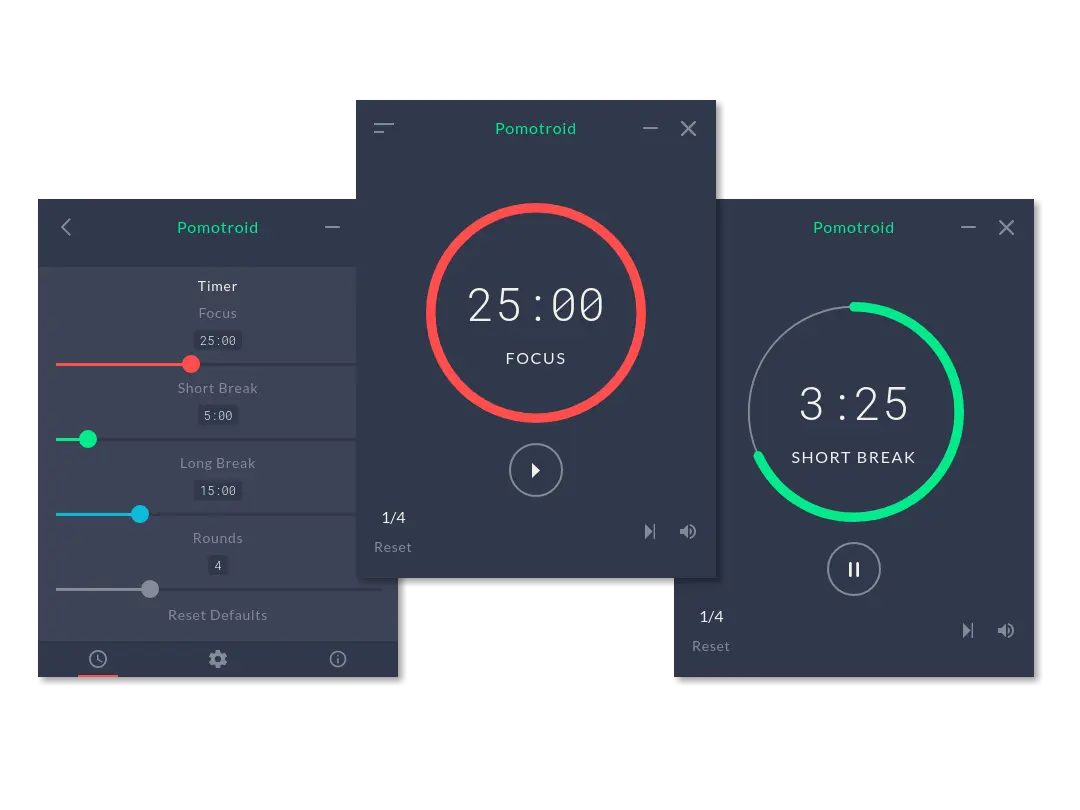
Why Pomotroid is the Best Choice for Focus
Built for developers, designers, and students who value aesthetics and functionality. Pomotroid strips away the clutter so you can get into the flow state.
Fully Customizable Themes
Don’t settle for boring defaults. Pomotroid allows you to customize colors via simple JSON configuration. Match your timer to your IDE, wallpaper, or mood. Visit our Themes Gallery to find your perfect look.
Mini Mode & Always on Top
Screen real estate is precious. Switch to Mini Mode to shrink the timer into a compact bar. Toggle “Always on Top” to keep track of your remaining time without it getting in the way of your work.
Tick Sounds & Notifications
Optional ticking sounds can help induce flow, especially for users with ADHD. Receive desktop notifications when a round ends or a break begins, ensuring you never miss a transition.
Built with Vue & Electron
Pomotroid is built on modern web technologies (Vue.js) wrapped in Electron. This ensures a consistent experience across Windows 10/11, macOS, and Linux distributions.
Master the Pomodoro Workflow
Pomotroid is more than just a timer; it is an implementation of the Pomodoro Technique®. Follow these 4 steps to maximize your productivity and prevent burnout.
Pick One Task
Identify a single task to tackle. Close all unrelated tabs. Multitasking is the enemy of deep work.
Focus (25m)
Start Pomotroid. Work intensely until the timer rings. If a distraction pops up, write it down and get back to work.
Short Break (5m)
Step away from the screen. Stretch, grab water, or look out a window. Let your brain reset.
Long Break
Every 4 rounds, take a longer 15-30 minute break. This is crucial for sustaining energy throughout the day.
Pro Tip: Use the Mini-Mode
Pomotroid is designed to be unobtrusive. Once you start your timer, toggle Mini Mode (or use the shortcut) to shrink the timer to a tiny bar. Keep it “Always on Top” so you can glance at the time remaining without it blocking your work.
Get Pomotroid for Desktop
Select your operating system below to download the latest stable release (v0.13.0).
Download Links
-
Download .exeWindows Installer .exe | 64-bit | Windows 10/11
-
Download .dmgmacOS (Intel/M1*) .dmg | Requires Rosetta 2 on M1/M2
-
Download .AppImageLinux AppImage .AppImage | Ubuntu/Debian/Arch
Important Notes
- Last Updated: Jan 2021. This is a legacy open-source project.
- macOS Users: You may need to “Right Click > Open” to bypass the unidentified developer warning.
- Mobile: Pomotroid is desktop only. There are no iOS or Android apps.
Need Mobile Sync?
If you need a timer that syncs between your phone and computer, check out the alternatives below.
View Alternatives ↓
Love Pomotroid, but need More Features?
Pomotroid is fantastic for local use, but modern work often requires cross-device sync and task management. Here is how it compares to top-tier productivity tools.
| Feature | Pomotroid | TickTick / Notion |
|---|---|---|
| 💰 Price | Free (Open Source) | Free / Premium |
| 🔄 Cloud Sync | ❌ No (Local Only) | ✅ Yes (Instant) |
| 📱 Mobile App | ❌ No | ✅ iOS & Android |
| 📅 Task Manager | ❌ No | ✅ Integrated |
| 🎨 Aesthetics | ⭐⭐⭐⭐⭐ | ⭐⭐⭐⭐ |
TickTick
A powerful to-do list with a built-in Pomodoro timer. Perfect if you want to link your focus sessions directly to specific tasks.
- ✅ Syncs across Phone & PC
- ✅ White Noise Generator
- ✅ Detailed Focus Statistics
Notion
The ultimate workspace. While not a timer itself, thousands of users embed Pomodoro widgets into their Notion dashboards to manage entire projects.
- ✅ Infinite Customization
- ✅ Embed Pomodoro Widgets
- ✅ Great for Students & Teams
Community Feedback
Loved by Developers & Creators
“Finally, a timer that doesn’t look ugly on my desktop. The mini-mode is a lifesaver for coding sessions—it stays out of the way but keeps me aware of the time.”
“Simple, clean, and does exactly what it says. The custom themes feature is surprisingly fun. I matched the timer colors to my VS Code Dracula theme.”
“I have ADHD and struggle with time blindness. The optional ticking sound really helps me stay in the zone without being annoying. Highly recommended.”
Join thousands of users improving their workflow.
Download Pomotroid Now →Make It Yours
Explore our community-curated collection of beautiful themes. From dark mode to pastel vibes.
Frequently Asked Questions
Is Pomotroid free to use?
Yes, absolutely. Pomotroid is free and open-source software (FOSS). You can download it for Windows, macOS, and Linux without paying a dime. If you want to support the original developer, you can find the repository on GitHub.
Is Pomotroid safe to download?
Yes. The code is open-source and transparent. However, since the app hasn’t been signed with an expensive Apple developer certificate recently, macOS users might see a warning. You can safely bypass this by right-clicking the app and selecting “Open”.
How do I customize the colors?
Pomotroid uses a JSON configuration system. You don’t need to be a coder to use it! simply go to our Themes Gallery, copy the code snippet of the theme you like, and paste it into your Pomotroid settings.
Is there a Pomotroid app for Android or iPhone?
No, Pomotroid is currently a desktop-only application built with Electron. If you need a Pomodoro timer that works on your phone and syncs with your computer, we recommend checking out these mobile alternatives.